1. Studio Overview
indicatrix-cut is the flagship GUI application of the Indicatrix ecosystem. Built with Slint 1.17, it provides a fluid, responsive native interface on both Linux and Windows.
The studio seamlessly integrates three key pillars of modern lapidary work:
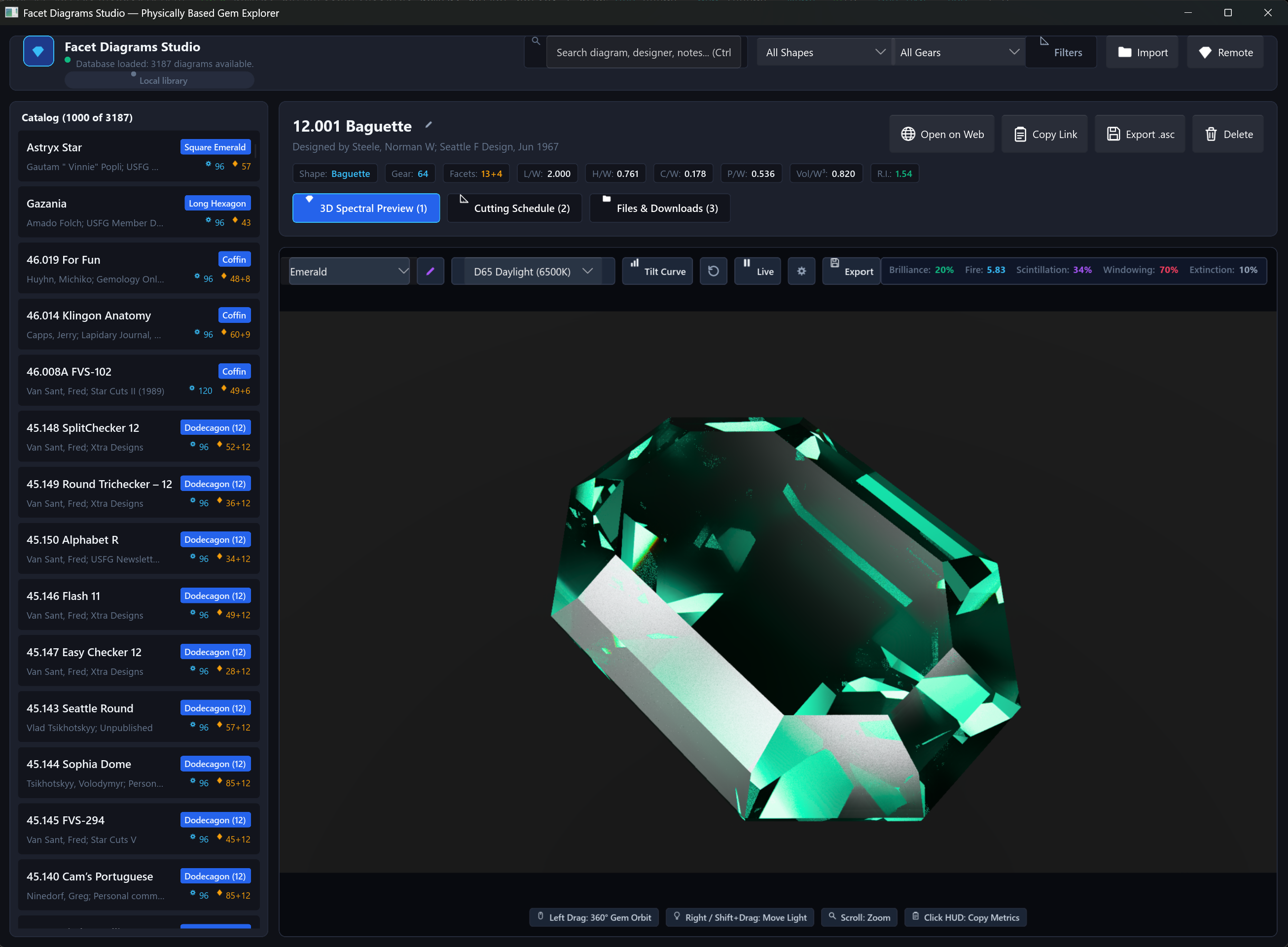
- The Catalogue Browser: Search, filter, and organize your personal faceting library.
- The 3D Spectral Viewport: Photorealistic real-time ray tracing with progressive accumulation, live gemological performance indicators, and tilt curves.
- The Faceting CAD Engine: Edit cutting tiers, define rough preforms, solve meet points, check manufacturability, and optimize angles for different gem species.
2. The Local Design Catalogue
Your designs belong entirely to you. Indicatrix stores your catalogue in a local SQLite database (facet_diagrams.sqlite) with zero telemetry, zero cloud locks, and zero external tracking.
Parametric Filtering
- Refractive Index Range: Find designs calculated for specific materials (e.g., Quartz 1.54, Beryl 1.58, Corundum 1.77, Diamond 2.42).
- L/W Ratio Range: Filter by stone proportions (1.0 for rounds and squares; 1.3–1.8 for ovals and marquises).
- Facet Count & Gear: Filter by pavilion, crown, or total facet count, and index gear tooth count (96, 64, 80, 120).
- Shape Vocabulary: Automatic classification into Round, Oval, Cushion, Emerald, Trillion, Heart, Freeform, and more.
- Full-Text Search: Fast search over titles, designers, and footnotes.
Import & Export
Import single .asc GemCAD files or entire folders of cutting schedules. Original files are preserved byte-for-byte in the database as attachments, alongside rendered preview thumbnails and notes.
3. The 3D Spectral Viewport & Controls
The main viewport runs the full spectral path tracer directly:
- Interactive Orbit Camera: Left-click and drag to rotate the stone in 3D space; right-click to pan; scroll wheel to zoom.
- Progressive Accumulation: Renders progressively refine from 1 to 256+ samples per pixel (SPP). When the stone moves, the buffer resets instantly to deliver low-latency interaction.
- Adjustable Lighting & Presets: Choose from Studio Ring Lights, Key & Fill spotlights, or load custom 32-bit Radiance equirectangular
.hdrenvironment maps. - Gemological Performance Readout: Real-time readouts of:
- Brilliance (%): Percentage of incident light returned through the crown to the eye.
- Fire Index: Dispersion measure characterizing rainbow prismatic flares across Fraunhofer lines.
- Scintillation (%): Flash contrast and dynamic sparkle as the stone tilts.
- Windowing (%): Light lost through the pavilion (the "fish-eye" effect).
- Extinction (%): Dark, non-reflective facet zones.
4. 181-Point Tilt Performance Sweeps
A gemstone is not a static object: it is held in the hand and turned under light. A design that looks brilliant face-up may black out or window severely at just 10° of tilt.
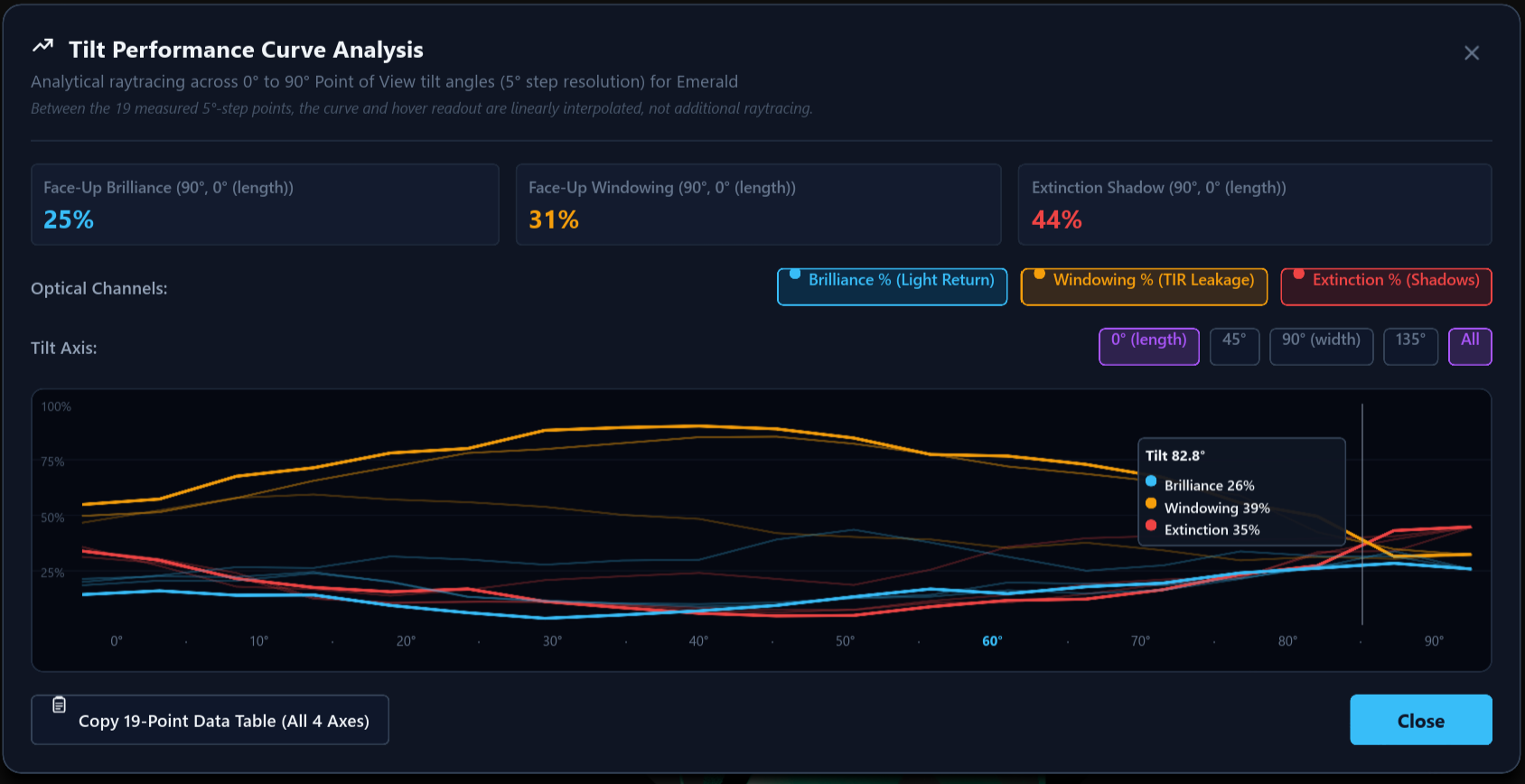
Indicatrix sweeps 19 discrete tilt angles (interpolated to 181 points) across four camera azimuths (0°, 45°, 90°, 135°). The interactive graph plots Brilliance, Windowing, and Extinction simultaneously, showing you precisely how the cut behaves at every angle of view.
5. Constraint-Based Solver & Tier Editor (`indicatrix-cut-core`)
Unlike traditional software where cutting schedules are static lists of numbers, Indicatrix treats a design as an editable geometric constraint graph.
The Meet-Point Solver
Faceting schedules frequently specify meet-point cutting: "Cut facet tier P2 until it meets P1 and G1 at a single sharp point".
Indicatrix's analytical meet solver calculates the exact mast (depth) distance by intersecting the plane normal with adjacent vertex coordinates. If you change the angle of a tier, the solver automatically recalculates the cutting depths of all dependent tiers down the schedule.
Rough Preforms
Define the physical rough gem before cutting: cylinders, cubes, cones, or custom prisms. Indicatrix reports:
- Exact Volumetric Yield (%): Ratio of finished gem volume to initial rough volume.
- Estimated Carat Weight: Derived from the material's specific gravity table.
- Preform Exceed Warning: Alerts you immediately if a proposed facet design breaches the rough boundary.
Manufacturability Linting
Before you cut stone, Indicatrix runs automated manufacturability checks:
- Vanishing Facets: Detects tiers that fail to form actual geometric faces on the finished stone.
- Undersized Facets: Flags facets that are too microscopic to cut reliably on a standard lap.
- Gear Quantization Errors: Identifies rounding errors in index gear divisions.
- Out-of-Order Meets: Flags schedules where a tier references vertices that haven't been cut yet.
6. Autonomous Angle Optimizer
Want to maximize brilliance or recut a quartz design for sapphire?
The built-in coordinate-search optimizer evaluates the objective function:
Score = w_brilliance · Brilliance − w_windowing · Windowing − w_tilt · TiltDropoff
The optimizer explores free facet angles deterministically, ensuring that:
- Pinned tiers (e.g., girdle facets) never move.
- Proposed angles strictly maintain closed polyhedral geometry.
- No manufacturability warnings are introduced.
7. Solid Inspection View
The Edit tab features a secondary 3D Solid Inspection View:
- Polyhedral B-Rep Mesh: Displays exact facet edges, vertices, and facet polygon outlines.
- Facet Picking: Click on any facet in 3D to jump directly to its tier in the cutting schedule table.
- Critical-Angle Risk Overlays: Highlights facets where incident light exceeds the critical angle and risks severe windowing (color-coded in amber and red).
8. High-Resolution Wide-Gamut Master Export
When you need publication-grade images for portfolios, websites, or client presentations:
- Resolution up to 8192 × 8192 (8K) at up to 32,768 samples per pixel.
- Color Spaces: sRGB, Display P3, and Rec.2020. Wide-gamut exports embed certified ICC color profiles.
- File Formats:
- Standard GemCAD
.asccutting schedules. - Native paired
.indicatrix.tomlsidecars preserving constraints, preforms, and custom materials. - Lossless 16-bit PNG master renders.
- Standard GemCAD